

Microsoft 365 Copilot
Get permissions and data in order before you switch on Microsoft 365 Copilot
Inthouse reviews permissions, sharing and data hygiene across SharePoint, OneDrive and Teams for organizations preparing for Microsoft 365 Copilot. When you switch it on, you know who can reach what.
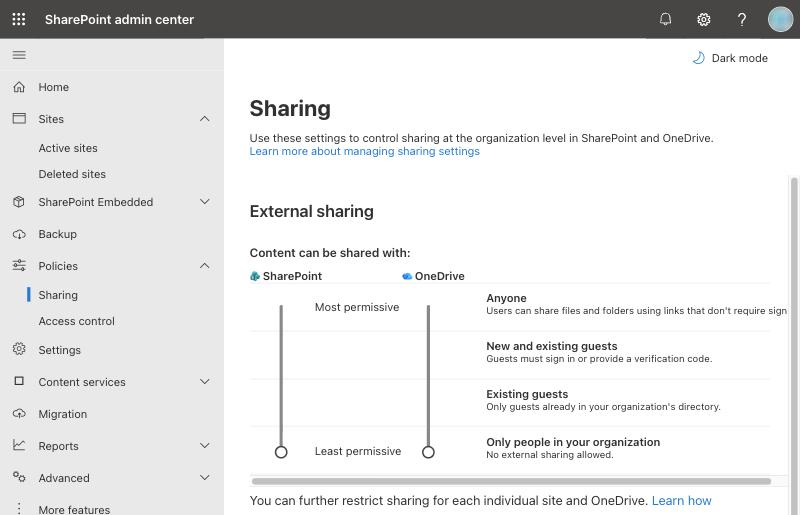
Microsoft 365 Copilot only uses the organizational content each user can already access
When Microsoft 365 Copilot draws on your organization's content, it only uses what that user already has permission to see. A file that's shared too widely can turn up in the Copilot answers of anyone who has access to it. That's why readiness starts with permissions.
Does this sound familiar?
You want to switch on Microsoft 365 Copilot, but you're not sure what content it will surface, or to whom.
You can't see in one place who has access to what across your SharePoint sites and Teams.
Over time, broad sharing links, public sites and unused guest accounts have piled up.
Sensitive documents aren't labeled, and old or duplicate files sit right next to current ones.
What we do
Permissions and sharing review
We find overly broad permissions and sharing links across SharePoint sites, OneDrive, Teams and Microsoft 365 groups. Guest accounts and group memberships in Microsoft Entra ID are part of the review too.
Protecting sensitive content
We design Microsoft Purview sensitivity labels around your classification scheme and apply them to sensitive content. With labels that apply encryption, protection stays with the file even after it's shared.
Data hygiene
We clear out old, duplicate and ownerless content, along with unused sites and teams. You decide with us what gets archived, so Microsoft 365 Copilot is less likely to draw on outdated information.
Keeping compliance rules in place
Readiness isn't a one-off, because new content arrives every day. Compliance Agent is our product for enforcing your compliance rules across Microsoft 365 content; you'll find it at complianceagent.net.
How do you get ready for Microsoft 365 Copilot?
Copilot doesn't grant new access; it makes existing access visible. So readiness starts by mapping who can reach what. Once the riskiest areas are fixed, it's safer to switch Copilot on for a small group first.
Discover
We map permissions, sharing links and where your sensitive content lives.
Design
We agree the access model, the label structure and what to fix first.
Deliver
We tighten permissions, apply labels and clear out old content. Then we recommend switching Copilot on for a pilot group first.
Support
We put rules in place for new sites and sharing, and help keep things in order with SLA-backed support.
Frequently asked questions
How does Microsoft 365 Copilot access our data?
When Microsoft 365 Copilot draws on your organization's content, it only uses what the user can already access. It doesn't widen permissions, but it makes widely shared content much easier to find.
Do we have to do this before switching on Microsoft 365 Copilot?
Microsoft doesn't require it as a technical prerequisite. But where permissions are messy, Microsoft 365 Copilot can show sensitive content to people who have access but shouldn't.
Where do you suggest we start?
In the intro call, we talk through your environment and pick the riskiest area together. If you'd like to see your license usage first, start with the Microsoft 365 health check, which is free once per organization.
What access do you need for the review?
Only as much as the work requires, and only with your approval. We agree the scope of access with you before we start.
How do we keep things in order afterwards?
New sites, teams and sharing links appear every day, so you need rules and regular checks. We can run this as an SLA-backed managed service, and Compliance Agent enforces your compliance rules across Microsoft 365 content.
Related services
SharePoint Online · Microsoft 365
Microsoft 365 and SharePoint
Intranets, document management and workflows; moves to Microsoft 365.
With your team
Workshops
Focused sessions that turn one topic into a roadmap with your team.
SLA
Managed services
Ongoing, SLA-backed support for your Microsoft environment.
Related articles
Before you turn on Microsoft 365 Copilot: an oversharing checklist
Before you turn on Microsoft 365 Copilot, a checklist for reviewing permissions, sharing links and labels across SharePoint, OneDrive and Teams.
Let's review your Microsoft 365 Copilot readiness together
In the intro call, we talk through your Microsoft 365 environment, your Copilot plans and the data you care about most.